Ultimea SkyWave X70 and Poseidon E100 Review
I tested the Ultimea SkyWave X70 soundbar and Poseidon E100 projector for two weeks. Here is how this budget home cinema setup actually performs.

Written by
Zino
Some links on this page are affiliate links. If you buy through them I earn a small commission, at no extra cost to you.
You do not need to spend thousands of euros on brand-name audio gear to get chest-thumping bass and real surround sound in your living room. The Ultimea SkyWave X70 delivers genuine 7.1.4 Dolby Atmos audio with a massive 10-inch subwoofer for a fraction of what you would pay for Sonos or Samsung. The companion Poseidon E100 projector is bright and whisper-quiet, but it brings some annoying compromises that make it a much tougher sell.
I spent two full weeks testing both devices in my own room. As I said in my video review, "You're being charged thousands for a name brand, while Ultimea is doing this for half the price." But budget hardware always comes with trade-offs, and you need to know exactly what those are before spending your money.
Setting up the modular Ultimea SkyWave X70 soundbar
Most high-end soundbars arrive in a massive, unwieldy box that is awkward to carry up a flight of stairs. Ultimea solves this by breaking the main 1100 mm bar into three modular pieces that connect using solid metal locking pins and internal data contacts.
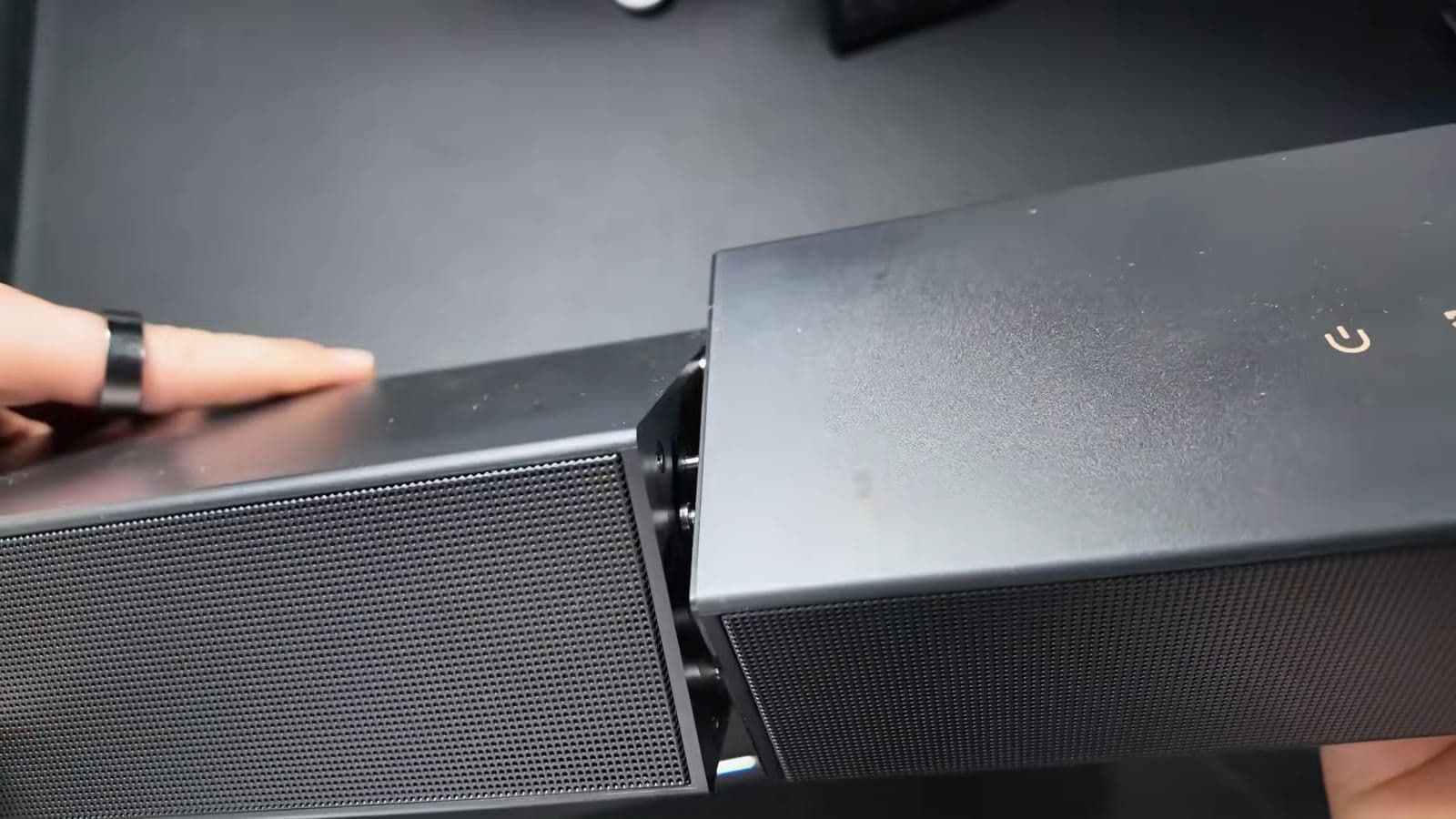
I was skeptical about this design before unboxing it. Usually, interlocking audio hardware feels cheap or flimsy once you assemble it. Here, you slide the outer sections into the center piece, give them a twist, and they lock securely into place. As I noted during the unboxing, "It takes maybe 10 seconds, and once assembled, it feels solid. Not wobble, no gaps, just one clean bar."
The soundbar features 12 discrete drivers in total, pushing out up to 980W of peak power. The central bar houses eight drivers, including two dedicated up-firing speakers for height effects and tweeters equipped with MRF anti-distortion tech. The rear wireless surround units each house side-firing and upward-firing modules to bounce sound around your seating area.
There is one physical catch you have to plan around during installation. While the audio connection to the surrounds and the 10-inch subwoofer is completely wireless over a 5GHz band, every single box requires its own wall power. That means you need four separate power outlets scattered across your room just to power the sound system. If your couch is not near an electrical socket, you will be running extension cords along your baseboards.
How the SkyWave X70 sounds compared to premium systems
On 15 January 2026, the SkyWave X70 was priced at €606 on MediaMarkt NL and $699 on Amazon US. At that price point, expectations are normally modest. A complete Sonos Arc Ultra setup with a sub and rear speakers easily sets you back around €2000.
Straight out of the box, my first reaction was simple: this thing is loud. In fact, it is way too loud and boomy on default settings. The 10-inch subwoofer digs all the way down to 20Hz, and it will immediately rattle your doors if you leave the bass turned up. Once you turn down the initial sub gain, the physical impact in action movies is staggering. When watching explosion-heavy films, the low-end vibrations shook my couch and floor with real authority.
Positioning and spatial height are surprisingly accurate for an affordable kit. Rain and overhead aircraft effects register above your head, while the rear units do a reliable job of tracking pans from front to back. Dialogue stays clean through the dedicated center channels, avoiding the muddy mid-range that plagues most cheap bars.
If you listen to pure acoustic music, a high-end Sonos setup still has cleaner separation and a more natural top end. But when it comes to action blockbusters and room-shaking effects, the Ultimea easily punches above its weight class. "For movies, I think the Ultimea wins. For music, the Sonos wins, but not by much."
Fine-tuning audio with the Ultimea companion app
The real secret to making this soundbar sound decent is the Ultimea companion app on your phone. Without it, you are stuck with coarse adjustments on the physical remote.
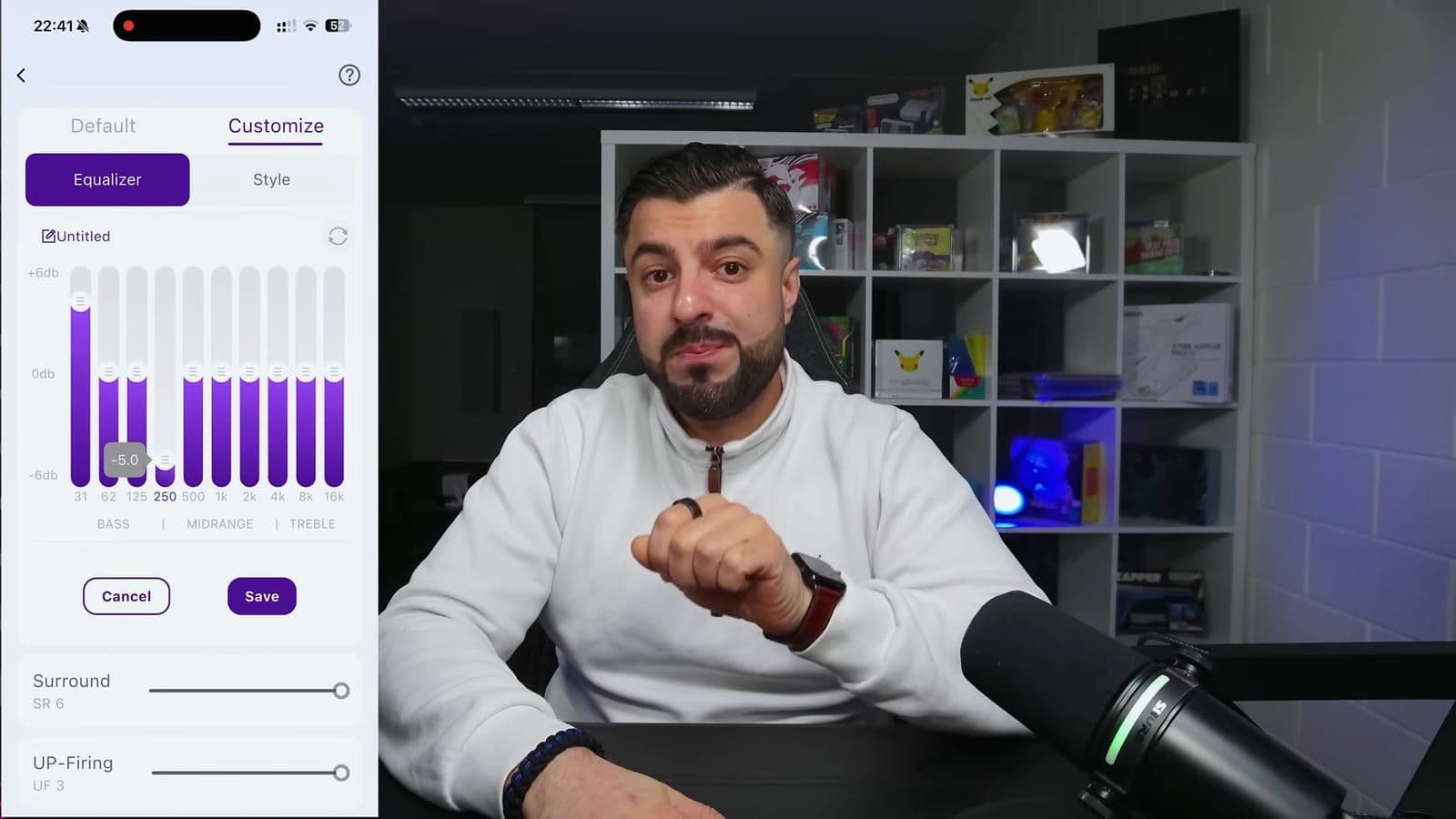
The app gives you a comprehensive 10-band equalizer and 121 pre-tuned audio presets. You can tailor sound profiles specifically for dialogue clarity, sports broadcasts, gaming, or late-night listening. Adjustments happen with zero perceptible lag while content plays in real time.
More importantly, the app lets you adjust the decibel trim for individual driver sets independently. You can boost the up-firing ceiling drivers without touching the main volume, or dial back the surround channels if the rear speakers sit close to your ears. You can also turn off the front LED display completely so it does not distract you in a pitch-black room.
Real-world picture quality from the Poseidon E100 projector
Alongside the soundbar, I evaluated the Ultimea Poseidon E100 projector. It retails for roughly €848 on MediaMarkt NL or $799 on Amazon US, as checked on 15 January 2026. You can also check direct availability on the Ultimea official website.

The projector is built around a 0.47-inch Texas Instruments DMD DLP chip with a native 1080p resolution. It accepts 4K input signals and downscales them. The optical engine is fully sealed to IP5X standards, preventing stray dust specks from burning onto the internal panel.
Many budget projector manufacturers inflate their brightness ratings, but the 1800 ANSI lumens on this unit hold up under testing. "Most budget projectors claim high lumens, then you test them, they lie. This one, it's real." In a dark room, projecting onto a standard pull-up screen yields vivid colors, strong contrast, and sharp detail across a 100-inch diagonal at 2.6 meters.

The cooling system is quiet. I measured fan noise at approximately 23dB during continuous playback, making it practically silent once movie audio starts. Setup is painless thanks to fast auto-focus, 6D auto keystone correction, and 100% lens offset. The integrated Google TV interface runs official Netflix and streaming apps smoothly without needing a separate TV stick.
Daytime performance is mixed. With window shades open, colors wash out heavily. It works fine for following live sports in daylight, but serious movie viewing requires drawing the curtains.
The trade-offs you have to accept with this setup
Ultimea hit aggressive prices on these units by leaving out a few key hardware features. If you are a home cinema purist, these omissions might be dealbreakers.
First, the SkyWave X70 soundbar lacks native DTS decoding. If you play a physical 4K Blu-ray disc with a DTS-HD Master Audio or DTS:X soundtrack, the bar cannot decode the raw stream. Your player or TV must transcode that signal into multi-channel PCM before sending it out. The soundbar will still play it and upmix it, but purists who want untouched bitstream decoding will be annoyed.
Second, the Poseidon E100 projector does not have an HDMI eARC port. It only has standard HDMI input and optical audio output. Because of that, you cannot route high-bitrate Dolby Atmos audio from the projector back down into the SkyWave X70 over a single cable. To get real Atmos audio out of the soundbar, you must connect your streaming box or console directly into your soundbar or television first.
These two products were not engineered to be a plug-and-play combo. Treat them as two separate purchases rather than a unified set.
Who should buy these and who should skip them
Buy the Ultimea SkyWave X70 soundbar if you stream your movies through Netflix, Disney+, or Apple TV and want real physical surround sound with massive bass under €700. It wipes the floor with similarly priced standalone bars that lack rear channels and subwoofers.
Skip the SkyWave X70 if you have a massive library of DTS-encoded physical discs, or if your room layout makes running four power cords impossible.
Buy the Poseidon E100 projector if you want a quiet, compact, dust-proof 1080p projector with genuine 1800 ANSI lumens and official Google TV support for casual evening viewing.
Skip the Poseidon E100 if you expect native 4K resolution at the €850 price mark, or if you need an eARC port to link directly to an external Atmos audio system.
Frequently asked questions
Can the Ultimea SkyWave X70 decode DTS audio tracks?
No, the SkyWave X70 does not feature native DTS or DTS:X hardware decoding. You must configure your Blu-ray player, console, or media streamer to convert the audio output to multi-channel PCM. The soundbar will then accept and upmix the signal across its 7.1.4 channels.
Is the Ultimea Poseidon E100 projector bright enough for daylight use?
The 1800 ANSI lumens output allows you to watch high-contrast content like live sports in a room with ambient light. However, direct sunlight will wash out darker scenes and colors. For critical movie watching, dimming the room or using blackout blinds is still recommended.
How do the rear speakers connect to the Ultimea soundbar?
The rear surround speakers communicate with the main soundbar wire-free over a dedicated 5GHz frequency band. However, both rear units are active speakers that require their own separate power cables plugged into wall outlets.
Can you connect the Poseidon E100 directly to the SkyWave X70 for Dolby Atmos?
Because the Poseidon E100 lacks an HDMI eARC port, you cannot send uncompressed Dolby Atmos signals directly from the projector to the soundbar. You will need an external source like an Apple TV or media player connected directly to an audio extractor or directly to the soundbar inputs.
Get new reviews in your inbox
One email when a new review goes up. No spam, unsubscribe with one click.
Comments0
No comments yet. Be the first.